
X-STREAMITY on Enigma2
Plugin Installation & Server Setup Guide
How to Add IPTV on Enigma2
Installation, playlist configuration and troubleshooting.
Explore our Enigma2 tutorials and technical support resources.
Official Website | WhatsApp Support1. Download X-STREAMITY
Select the package compatible with your receiver, Enigma2 image and system architecture.
2. Open the X-STREAMITY Menu
After installing the compatible package, open X-STREAMITY and select Add Playlist.
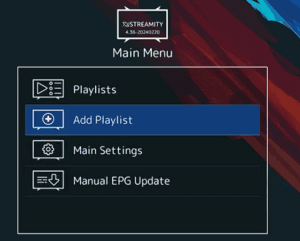
3. Configure Your Playlist
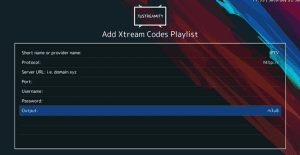
Enter the connection details supplied by your service provider.
4. Open Live Streams
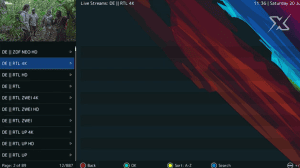
Save your playlist and open it. If the connection succeeds, browse the categories available through your service.
5. X-STREAMITY Interface

The available options may vary depending on the plugin version and installed image.
6. Troubleshooting
The server connection fails
Check the protocol, URL, port, username and password. Confirm that the service is active.
The package will not install
Verify the package format, system architecture, image compatibility and dependencies.
No channels appear
Check playlist status and account access. Contact your provider if necessary.
Which port should I use?
Use the exact port supplied by your provider.