
Premium-FHD Skin v2.4 for Enigma2
Discover Premium-FHD v2.4, a Full HD skin for selected Enigma2 satellite receivers. This guide includes screenshots, tested image versions, download packages, dependencies and installation instructions.
Skin Overview
Premium-FHD v2.4 was published on January 4, 2024. The original release lists three editions: Standard, Black and Blue. Always check the package requirements before installing the skin on your receiver.
- Version: 2.4
- Platform: Enigma2 satellite receivers
- Package format: IPK
- Editions: Standard, Black and Blue
Tested Enigma2 Images
The original publication lists the following tested image versions. Compatibility with other versions is not guaranteed.
- OpenATV 7.3
- OpenATV 7.4
- OpenBH 5.3
- Egami 10.4 R8
- OpenViX 6.4
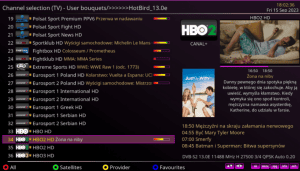
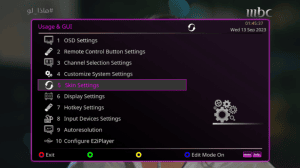
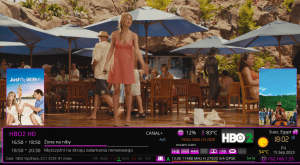
Premium-FHD v2.4 Screenshots
Explore the screenshots below. These three images are hosted on DaSilvaSat and appear in the order supplied.
Required Dependencies
The original release mentions the following components for the skin's additional features.
- Old Weather Plugin from a compatible image feed.
- PosterX Render for poster display.
- XtraEvent Plugin for event and poster information.
Dependencies may vary by image. Use trusted feeds and verify package compatibility before installing additional plugins.
Download Premium-FHD v2.4
The original publication lists three IPK packages. Choose the edition you need and verify the download before installing it.
Installation via Telnet
Download the selected IPK file and transfer it to the receiver's /tmp directory using a file transfer program. Connect to the receiver through Telnet and use the appropriate installation command.
IPK Installation Command
opkg install /tmp/REPLACE-WITH-EXACT-IPK-FILENAME.ipkReplace the example filename with the exact name of the IPK file you downloaded. Do not copy the placeholder literally. This command assumes your image uses opkg and that the package is compatible.
Activate the Skin
- Wait until package installation finishes.
- Open the Skin Settings menu on your receiver.
- Select the Premium-FHD edition you installed.
- Apply the selection and restart Enigma2 if requested.
Join Our Enigma2 Telegram Group
Join our Telegram community to discuss Enigma2 receivers, skins, plugins and general installation questions with other users.
Original Source
Visit the original publication for release details and the original installation information.
Conclusion
Premium-FHD v2.4 is available in Standard, Black and Blue editions. Check the tested image versions, install required dependencies from trusted sources and confirm compatibility before installation.